上傳 LINE 聊天紀錄,製作你那位變化莫測的主管 AI 分身,預知他會怎麼回。 Upload a LINE chat, build a twin of your unpredictable boss — and know the reply before you send.
主管、朋友、曖昧對象都行——選一個人,幾分鐘後直接跟他的 AI 分身對話;說話節奏、口頭禪、連錯字習慣都從語料裡蒸出來。想說的話,先對分身排練一次。 Boss, friend, or crush — pick a person and minutes later you're talking to their AI twin. Rhythm, catchphrases, even the typos, distilled from the corpus. Rehearse what you want to say first.

登入Sign in
與 Trailforge 共用同一組帳號。登入後蒸餾的分身只有你看得到。密碼至少 6 個字元。 One account across aiwalkcorp products. Twins you distill are visible only to you. Password: 6+ characters.
上傳聊天紀錄Upload a chat export
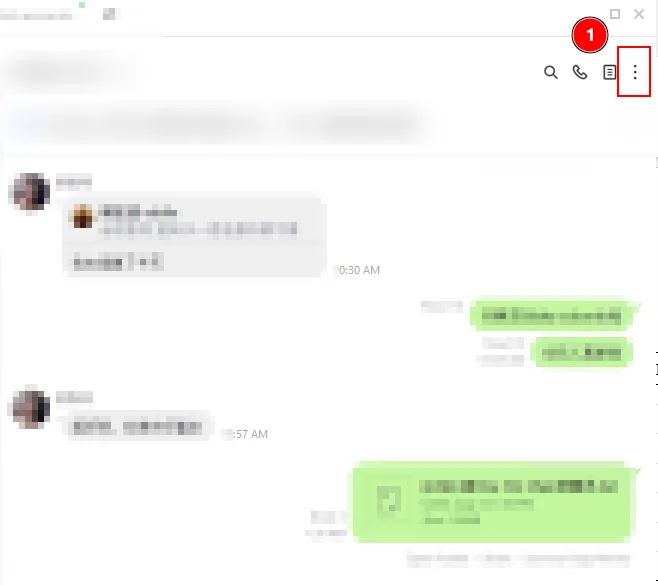
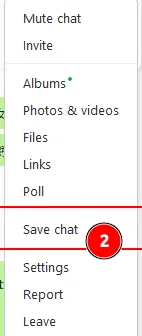
怎麼從 LINE 匯出 .txt?圖解教學How do I export a .txt from LINE? Illustrated guide
手機版 LINELINE mobile
電腦版 LINE(實際畫面)LINE desktop (actual UI)
選擇要復刻的人Pick who to copy
名單依發言量排序;至少要有 30 句文字訊息才蒸得出來Sorted by message count; at least 30 text messages are needed
蒸餾中Distilling
人格檔正在成形The persona is taking shape
對話Chat
分身只知道語料裡的事;私人資訊它會裝傻The twin only knows what's in the corpus; it plays dumb on private matters
加購對話包Buy chat credits
對話包是一次性數位服務:購買後即時開通至你的帳號,對話與蒸餾按實際用量從剩餘額度扣除,用多少算多少;限本帳號使用、不可轉讓。刷卡由綠界 ECPay 處理,本站不經手卡號。 A chat pack is a one-time digital service: credits activate on your account instantly, and chats and distillations draw from them by actual usage — account-bound, non-transferable. Cards are processed by ECPay — we never see your number.
自訂金額 NT$5 起;付款經由綠界 ECPay(PCI DSS 認證),本站不經手付款資訊Custom from NT$5 · Payments via ECPay (PCI DSS certified) — we never handle payment details
再丟一份含這個人發言的 LINE 匯出 .txt——語料會合併去重後重新蒸餾。分身只保留這個人自己的發言(刪除分身即一併刪除),整份聊天檔仍然用完即刪。 Upload another LINE export .txt with this person's messages — lines are merged, deduplicated, and re-distilled. The twin keeps only this person's own lines (deleted with the twin); the full chat file is still deleted after use.
裁剪頭貼Crop avatar
拖曳調整位置、滑桿縮放——方框內就是頭貼。 Drag to position, slide to zoom — the square is your avatar.
開一個群組New group
挑 2–4 個分身放進同一個聊天室。你發一句話後,分身之間最多自動接力你設定的回合數就會停下——不會自己一直聊下去。 Pick 2–4 twins for one room. After each message you send, the twins relay at most the number of turns you set, then stop — they never run away chatting.